
OpenLoco v26.04 is out! This month’s release introduces the first version of a new feature that has been in the works for a few months: blueprints! Moreover, we have a bunch of bugfixes and improvements lined up. Please read on for the details.
Start copy/paste implementation for blueprints
One of the long-term plans we set out with when starting OpenLoco, is the idea of blueprints. These would allow you to save and rebuild parts of your map in another. For example, that massive station with an interchange you made? Yeah, you would be able to save that, and rebuild it in the same or other map.
Obviously, this is not a trivial feature to add. As such, we never really got around to implementing it… until @duncanspumpkin suddenly had a nice proof-of-concept for basic copy/paste functionality (#3649). You simply select part of the map to copy it, then paste it elsewhere on the map. This then provides basic proof-of-concept functionality behind these blueprints. Over the past month, some of the rough edges were smoothed out, and we decided to merge it as part of the construction window — for now.
At present it will only work for railroad track, signal and station map elements. We will look to improve the support for other map elements such as roads, buildings, and terrain.
In the near future, we aim to extend this feature into the full-blown blueprints feature we talked about. We’re not quite sure where they’ll go yet. Maybe in a tab in the construction window, or maybe in a seperate window entirely? Exciting times, for sure.
For a simple example, check out the following clip:
Fix auto layout for cars that are centered
A few community members have reported the fact that when a vehicle object has the
centrePosition flag, it does not correctly centre on the train. This bug was introduced when
@duncanspumpkin reimplemented the train auto layout code. The vanilla game’s auto layout code
was very long and complex, and had to be implemented all in one go. This often leads to mistakes.
For this particular issue, at the time, Duncan had it working almost correctly,
except when there was an even amount of cars. Whilst fixing, that though, this bug slipped in
Just typical that, whilst fixing an edge case, you completely break the general case!
@Hammster created a fix for the issue (#3572) and Duncan tidied up the fix to make it align with the codebase.
Fix loan potentially going negative (#3688)
A few releases ago, @duncanspumpkin decided to try align all of our UI code that handled increasing/decreasing amounts. This was meant to reduce the chance of subtle bugs in the various places where we do this. Unfortunately, for the loan payback, he forgot that money types can go negative, so the wrong lower limit was set.
It was easy to fix, Duncan wanted to go through all the other changes he made for increasing/decreasing to ensure he hadn’t made similar mistakes. Fortunately, we concluded he hadn’t.
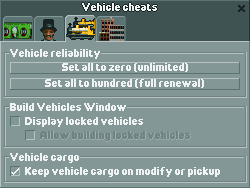
New cheat: keep cargo on vehicle pickup/modify
Tired of losing cargo when picking up or modifying a vehicle? We’re guessing that’s how @ethan-xd felt when he implemented a cheat to prevent just that (#3591). It’s just a checkbox away.
Jukebox improvements
This month, we’ve merged a few of @LeeSpork’s patches on what seems to be their favourite part of the code base: the jukebox. Notably, they fixed music automatically resuming after saving when the game paused (#3185), even when the game itself would still be paused.
The original Locomotion title theme can now be added to the ‘custom’ jukebox playlist as well (#3639). It is still not included by default.
After last month’s addition of separate volume sliders for the various game audio channels, the jukebox suddenly felt out of place. Instead of just moving it back to its own tab in the options window, we’ve opted to move the jukebox into its own window instead (#3707). It can be quickly opened via the audio (ear) menu, or via a custom keyboard shortcut.
Refactor list windows to use faster sorting algorithm
Keen-eyed players may have noticed that the game’s list windows have always updated three rows at a time. This was most notable when the window was just opened: every game tick, three more rows would be added. Similarly, values for existing rows would be updated in an almost ‘scrolling’ fashion. While there was something satisfying about this, it also meant that it would take a few seconds before e.g. the higher-digit vehicles would appear in the lists.
This month, @AaronVanGeffen has reworked these lists to now use a two-step approach instead. When opening the window, all relevant ids are stored in
This applies to the company list (#3705), station list (#3704), industry list (#3703), town list (#3702), and vehicle lists (#3701) windows.
This fixes a problem with vehicle lists (#3701) where having both the general vehicle list as well as station-specific ones open at the same time could lead to flickering vehicle rows.
Finally, we unified the use of two window struct properties that were both used for keeping
track of the amount of rows displayed. As of this release, the previously unnamed variable var_83C
is no longer used for this purpose, replacing it with rowCount
(#3709).
Add more sorting options when building vehicles
As of OpenLoco v23.10, the Build Vehicle window has had options to search/filter the listed components, e.g. by powered/unpowered. Similarly, the list could be sorted by name or year of invention. @ethan-xd saw an opportunity to add more sorting options, and introduced the ability to sort descending as well (#3594).
Address sanitisation passes
Investigating a mysterious crash, @ZehMatt set out on an AddressSanitizer quest. Two bugs surfaced in the process.
First, he discovered copying news messages into the news window was going one byte beyond its buffer limit (#3719). Fortunately, this was a buffer on the top of the active stack frame, so unlikely to lead to anything truly bad.
Second, he discovered an issue with the routing iterator. The way it was set up would return a pointer to routing data, rather than the actual value (#3718). This meant that, in case the routing table changed, the iterator might suddenly return a different value than expected. As a preventative measure, this was changed to return a immediate value instead.
We’re not sure if either of these actually solved bugs that people actually encountered, but they’re a good examples of the kind of issue we have to look out for.
Name a few more previously unnamed things
@duncanspumpkin named the awaitingCargoTransfer flag, placed on vehicle components
(#3621).
As the name suggets, this indicates a vehicle component is waiting for a cargo transfer.
When placed on vehicle head structs it indicates that the vehicle cannot wait at the station for
further loading. In the future, we would like to split this off to a different flag to make
cargo loading more flexible.
When it comes to buildings, we recently discovered buildings are categorised into what we now call amenity categories. Towns use these to decide what buildings to keep or replace, and indeed to build. So far, we’ve named religious buildings (e.g. churches), hotels, parks, courthouses, parks, and landmarks. There is room for three more categories, but no vanilla objects seem to use them. In fact, most vanilla buildings do not have an amenity category, as they are general residential. Either way, it’s interesting to still discover more of these subtle, underlying mechanisms.
Objects that claim to belong to any of these newly discovered amenity categories now have their category validated. If an invalid value is found, the object now can no longer be loaded to prevent crashes (#3623). Such invalid values were especially dangerous as they could end up writing data to many different parts of the save file, corrupting saves in unexpected ways. Luckily, most of the time doing so would immediately cause a crash, though, instead of subtly corrupting your save!
On the topic of unexpected values, a similar check is now applied to the building generator function id associated with miscellaneous building objects.
There are still quite a few unnamed flags and variables left. If you feel like joining in on the naming effort, please reach out to us on Discord!
Localisation improvements
@erdikayaTR has improved the Turkish localisation, adding translations for newer strings and clarifying older ones (#3712).
Like Locomotion, OpenLoco support custom keyboard shortcuts. @LeeSpork noticed one of the lesser used modifier keys,
the Menu key, was not being localised. This has now been fixed (#3467).
Fix crash when starting bus behind bus
This was quite a curious bug, in that you only hit the issue when starting a bus immediately behind another bus when it is stationary. Technically, the vanilla game suffered from this mistake as well, but instead of crashing it would just read invalid memory and miscalculate the road occupancy. Instead of reading a non-existing object, the null value involved is now correctly ignored (#3698).
Fix new signals not correctly updating network
Due to a mistake made during implementing the ‘Place Signal’ code, depending on where you clicked on the track when placing a signal, the game might not actually update the signal network! This would cause unexpected crashes/stoppages of trains.
@duncanspumpkin investigated and fixed the issue (#3697). He realised that the issue was missed during testing, as back then we were using straight track pieces, which in retrospect wouldn’t be affected by the issue. There might yet be further issues with this code, so please let us know if you still encounter odd issues when adding a signal to track.